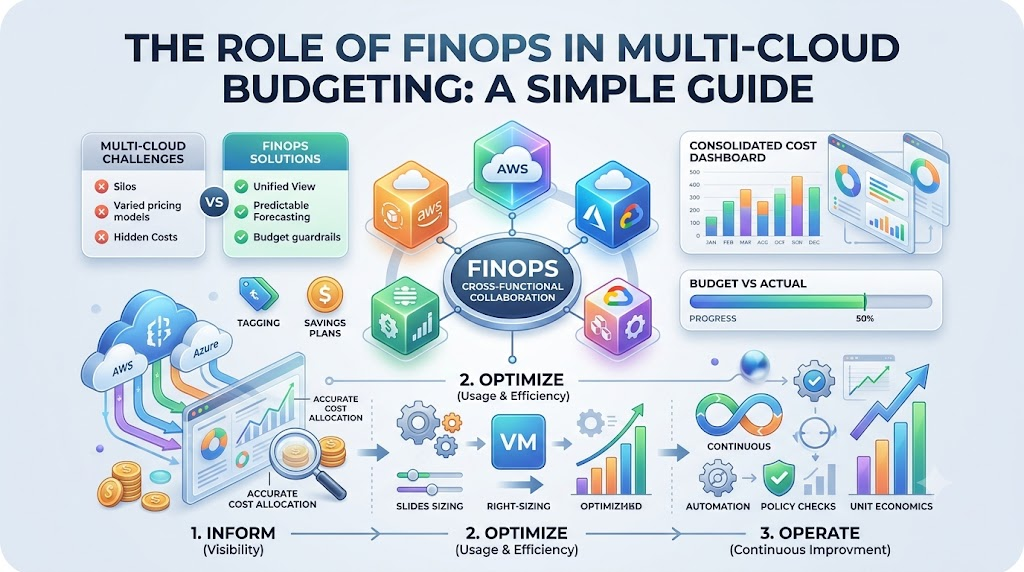
The cloud is like renting powerful computers over the internet. Many companies rent computers from two or three different sellers. People call this set of rented systems a multi-cloud setup.
However, paying bills across different sellers gets tricky fast. Costs can jump up before anyone notices. That is where a smart system called FinOps comes in to help. A learning site like Finopsschool teaches teams how to manage these exact cloud costs.
Next, let us see why handling several cloud bills feels so tough.
What Is a Multi-Cloud Budget?
A budget is a plan for how you spend your money. In tech, a multi-cloud budget tracks spending across different cloud providers.
Each provider bills you in its own special way. They use different names for the exact same tools. Because of this, finance teams struggle to see the big picture.
FinOps brings the tech workers and the finance workers together. Both groups sit down and talk to each other every week. They track spending so nobody faces a bad surprise at month’s end.
How Different Clouds Bill You
Every cloud company writes bills in a different format. One calls a computer an instance, while another calls it a virtual machine.
So, comparing costs feels like adding apples and oranges together. FinOps sets clear rules to clean up these bills. Teams translate all data into one common format they can read easily.
Now, everyone sees what each project costs across all rented systems. This shared view helps leaders protect their company wallet.
Key Operational Concepts You Must Know
Tagging Everything You Rent
A tag works just like a sticky name label on your lunchbox. When you build something in the cloud, you must add a label.
This label shows which team built the tool. It also shows the exact project that uses it. Because of tags, you always know who spends the money.
Without tags, rented computers run in the dark. Nobody knows who started them, so nobody turns them off. Tagging shines a bright light on every single penny spent.
Finding and Fixing Waste
Engineers often rent big computers just in case they need extra power. But most days, they only use a tiny piece of that power.
We call this problem over-provisioning, which simply means buying too much space. FinOps teams search for these half-empty machines every day.
Next, they shrink these machines down to the right size. This smart step is called right-sizing. Right-sizing saves money immediately without slowing down any apps.
Buying in Bulk for Big Discounts
Cloud companies give huge discounts if you promise to stay for a long time. You can save up to seventy percent off regular rates.
These special deals are called savings plans or reserved capacity. But you must plan carefully before signing these deals.
If your team changes its mind, you still must pay for the reservation. FinOps experts study past usage to pick safe commitments that save cash.
| Concept Name | Simple Meaning | Why It Matters |
|---|---|---|
| Tagging | Putting digital name tags on cloud assets | You see which team spends company money |
| Right-Sizing | Picking the right computer size | You stop paying for empty, idle space |
| Commitments | Buying time in bulk for a discount | You cut regular rates by a huge margin |
Platform Implementation vs. Culture — What’s the Real Difference?
Buying Tools Is Not Enough
Many bosses think buying a fancy software tool will solve their spending mess. They turn on new dashboards with colorful charts and graphs.
These tools do a great job finding waste and collecting numbers. But tools cannot click the delete button for you.
A screen can point out a problem, but it cannot fix bad engineering habits. That means tools only give you information, not real change.
+---------------------------------+       +---------------------------------+
|          Software Tools         |  -->  |        Team Daily Habits        |
|    (Find waste and make charts) |       |  (Clean up and build with care) |
+---------------------------------+       +---------------------------------+
Changing Daily Habits
Real success comes from building a strong FinOps culture. Culture simply means the daily habits and choices of your workers.
In a good culture, engineers care about cost just like they care about speed. They check price tags before they turn on any new database.
Finance workers also learn basic tech terms so they can help better. When both teams work as friends, money problems disappear quickly.
Real-World Use Cases of Modern Operations
Stopping the Weekend Energy Drain
A software company noticed high bills every single month. Their developers built test systems on Monday and walked away on Friday.
Those test systems ran all weekend while the office was empty. The cloud company kept charging full price the entire time.
The team then wrote a simple automation rule to stop the waste. The script shuts down test systems every Friday night. This single move cut their testing bills by more than half.
Tracking Costs for Food Delivery
A food delivery company ran its app on two different cloud networks. They wanted to know the cloud cost for every lunch order.
+-----------------------------------+
|  Order Placed on Phone App        |
+-----------------------------------+
                 |
                 v
+-----------------------------------+
|  Check Server Cost for That Order |
+-----------------------------------+
                 |
                 v
+-----------------------------------+
|  Keep Cloud Cost Under Ten Cents  |
+-----------------------------------+
They connected their multi-cloud data to track each customer transaction. Now, engineers see the cloud cost per single delivery in real time.
If an order costs too much in server power, developers fix the code. This metric keeps the company profitable even when traffic spikes.
Common Mistakes in Operations Engineering
Leaving Orphaned Storage Behind
A very common mistake is deleting a computer but leaving its hard drive on. These leftover disks are called orphaned resources.
The computer is gone, but the disk stays active on the bill. It quietly charges the company month after month.
Teams must set up automatic sweeps to catch these lonely disks. Turning them off keeps bills clean and stops silent budget leaks.
- Check testing spaces weekly to remove old tools nobody uses.
- Set up alarms for unattached storage disks right away.
- Delete old file copies after sixty or ninety days pass.
Trusting Default Settings Blindly
Default settings from cloud providers lean toward safety, not low cost. They often pick larger computers than your software really needs.
Many teams accept these suggestions without checking their actual traffic first. This mistake doubles your costs right out of the gate.
Always question the default numbers before launching a new tool. Start small and only add power when your app asks for it.
+--------------------------------------+
| Cloud Provider Suggests Big Machine  |
+--------------------------------------+
                   |
                   v
+--------------------------------------+
| Team Checks Actual App Traffic First |
+--------------------------------------+
                   |
                   v
+--------------------------------------+
| Pick Small Machine and Save Cash     |
+--------------------------------------+
How to Become an Operations Expert — Career Roadmap
Learn Cloud Basics First
Start by learning how basic cloud tools operate and charge money. You need to understand servers, networks, and data storage buckets.
Take beginner classes from the biggest cloud providers online. Practice building tiny test projects and watch how the bill grows.
Learn how to read billing sheets and write simple search queries. These skills form the base of all financial engineering jobs.
- Pass a basic cloud exam to prove your core technical skills.
- Learn basic database setup so you understand usage costs.
- Practice spreadsheet formulas to sort through raw cost tables.
Master Clear Communication
Great FinOps experts must speak two languages: tech and business. You must explain complex servers to accountants using plain words.
You must also explain budget limits to coders without making them angry. Good listening skills make you a super helpful teammate.
Practice writing short, clean updates for business managers. Leaders love workers who turn confusing data into clear action steps.
- Practice writing simple summaries without using confusing buzzwords.
- Show the business value behind every engineering decision you make.
- Build easy charts that any manager can read in ten seconds.
FAQ Section
- What is FinOps in plain English?
FinOps is a way for tech teams and money teams to work together. It helps them build fast apps in the cloud without wasting company cash.
- Why do multi-cloud setups make budgeting harder?
Different cloud providers use different names, rules, and bills. This mess makes it hard to see all your spending in one single place.
- What is the easiest way to cut cloud waste today?
Turn off test machines when nobody works, like on weekends and nights. Also, delete old, unused storage disks that sit around doing nothing.
- Do I need to be a math genius to work in FinOps?
No, you only need basic math skills and good curiosity. The job focuses more on team communication, simple habits, and steady organization.
- Why do teams buy reserved capacity?
They buy it to get large bulk discounts from the cloud seller. Committing to steady usage saves huge money compared to regular hourly rates.
Final Summary
Running apps across many clouds gives companies speed, freedom, and backup options. But without a budget plan, cloud bills will balloon quickly out of control. FinOps creates a shared team habit where engineers and money experts help one another. Everyone keeps an eye on spending, cuts waste, and chooses the right tools. When teams treat cost as a shared goal, their cloud systems run lean, fast, and happy.