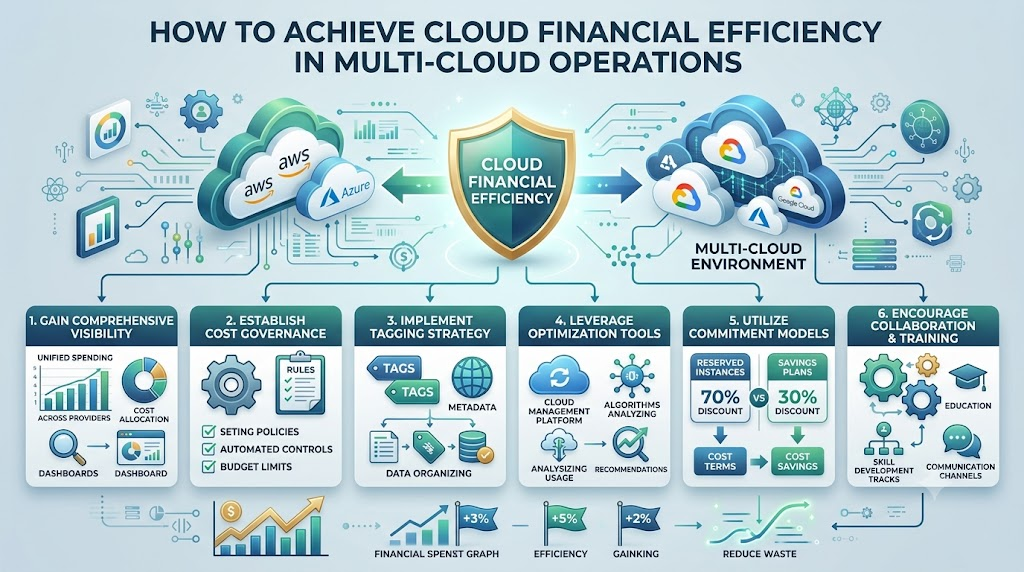
Running digital systems across multiple clouds helps companies avoid vendor lock-in. It also keeps services online if one provider has problems.
However, multi-cloud setups make budgets tricky. Every provider uses different bills, unique names for features, and separate dashboards. Without a plan, companies waste money on idle servers, forgotten storage, and hidden transfer fees.
Following the clear guide below makes running multi-cloud setups smooth and budget-friendly.
What Is Multi-Cloud FinOps?
FinOps means combining finance and engineering teams into one single team. It turns cost control into a daily habit instead of an end-of-month panic.
Think of the cloud like home electricity. You only pay for what you turn on.
When you use three different providers at the same time, keeping track of every switch gets tough. FinOps gives your team rules, habits, and visibility to keep bills low while running fast.
+-------------------------------------------------------------------+
|                        Unified FinOps View                        |
+-------------------------------------------------------------------+
           |                          |                          |
           v                          v                          v
   [ Cloud Provider A ]       [ Cloud Provider B ]       [ Cloud Provider C ]
Key Operational Concepts You Must Know
1. Unified Visibility and Normalization
Each platform names its charges differently. One calls a computer a “virtual machine,” while another calls it an “instance”.
- Standardize Data Names: Convert different provider invoices into one clean format.
- Single Dashboard: Bring all spending numbers into one main view.
- Real-Time Tracking: Watch daily spikes instead of waiting for a monthly invoice.
2. Universal Tagging Policies
Tags act like digital price tags on store shelves. Every piece of software gets a label showing who bought it and why.
- Owner: The engineer or manager in charge of the system.
- Environment: Whether the system serves live customers or runs internal software tests.
- Cost Center: The company team responsible for funding the server.
3. Rightsizing and Idle Waste Removal
Engineers often purchase extra-large servers out of fear that systems might slow down. This habit leaves lots of computing space empty all day.
- Downsize Instances: Cut CPU and memory down to match true daily use.
- Purge Orphaned Disks: Delete unused virtual hard drives left behind by deleted servers.
- Prune Network Nodes: Remove old connections that route zero daily web traffic.
| Optimization Lever | Core Action | Expected Impact |
|---|---|---|
| Data Tagging | Label all assets with owner and environment | Full transparency on spending |
| Compute Rightsizing | Match server sizes to real daily workloads | Up to 30% reduction in waste |
| Storage Tiering | Move old data to colder storage buckets | Slashes storage costs substantially |
| Data Egress Control | Stop unnecessary cross-cloud data transfers | Removes hidden provider penalties |
Step-by-Step Multi-Cloud Implementation
Step 1: Set Up Unified Tagging Guardrails
Start by enforcing naming rules using code. Block engineers from launching new servers if they forget to attach proper project tags.
This stops unassigned costs from growing unnoticed in quiet corners of your accounts.
Step 2: Stop Data Transfer Bleed
Moving files between different cloud platforms costs significant money in transit fees. These charges are called “data egress fees”.
Keep related systems inside the exact same cloud platform whenever possible. Only send summaries or finished results across the internet to other clouds.
Step 3: Automate Testing Schedules
Test systems do not need to run during weekends or late at night. Use simple scripts to turn off staging environments at the end of the workday.
Turning non-production servers off on nights and weekends can cut compute spend for those machines by over 60%.
+------------------------------------+
|  Build Universal Tagging Schema    |
+------------------------------------+
                  |
                  v
+------------------------------------+
|  Isolate Heavy Data Workloads      |
+------------------------------------+
                  |
                  v
+------------------------------------+
|  Automate Night & Weekend Stops    |
+------------------------------------+
Common Multi-Cloud Mistakes to Avoid
- Managing Accounts in Silos: Letting each cloud team operate alone without sharing budgets ruins cost visibility.
- Overcommitting Too Early: Committing to multi-year discounts on one platform before knowing your long-term plan limits your flexibility.
- Forgetting About Data Egress: Ignoring cross-cloud communication leads to massive bills for sending traffic between servers.
- Leaving Old Storage Active: Leaving test databases and system backups active for years drains money unnecessarily.
Frequently Asked Questions
Why does using multiple clouds cost more than using one?
Different providers charge different rates and penalize you for moving data between them. Managing several setups also requires extra tools and more staff.
What is the easiest way to save money on multi-cloud right away?
Turn off test machines outside office hours and delete unattached storage drives. These two quick wins deliver savings in your very first month.
Should small teams build multi-cloud systems right away?
Most small teams do best starting on a single provider. Only adopt multiple providers when compliance, reliability, or specific product features require it.
Creating efficient multi-cloud operations is an ongoing discipline, not a one-time project. By enforcing consistent tagging, eliminating idle assets, and monitoring cross-cloud data fees, technical teams can focus on fast releases while keeping financial stakeholders happy.