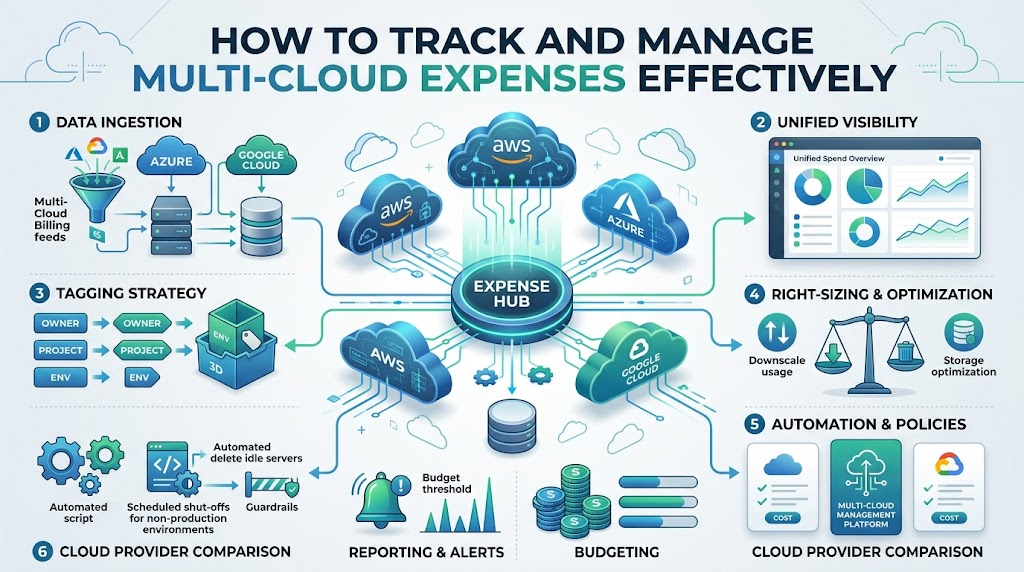
Running software on more than one cloud platform helps businesses stay online. It also stops companies from depending on only one provider.
However, paying bills across different platforms gets messy very fast. Every platform uses unique names, separate invoices, and confusing dashboards. Learning modern practices from Finopsschool helps teams track bills and stop wasteful spending.
This simple guide shows you how to track and manage multi-cloud spending with ease.
What Makes Multi-Cloud Bills Tricky?
Every cloud vendor acts like a store in a different country. They speak different languages and bill you in different formats.
One provider might call a computer an instance, while another calls it a virtual machine. Because the words never match, finance teams struggle to read all the bills together.
Without a single dashboard, companies end up with big billing surprises. Teams must unite their data to see what they spend each day.
+-----------------------------------------------------------+
|               One Single Expense Dashboard                |
+-----------------------------------------------------------+
             |                            |
             v                            v
   [ Cloud Provider A ]          [ Cloud Provider B ]
      (Instance Costs)            (Virtual Machines)
Key Steps to Track Your Cloud Bills
1. Use One Tagging System
Tags work like name badges pinned on backpacks. You stick a digital label on every server and database.
- The Owner: This shows the exact engineer in charge of the computer.
- The Project: This names the app or service using the cloud tool.
- The Environment: This marks whether the tool is for live users or internal tests.
2. Bring All Bills into One View
Do not jump between three different web portals every morning. Instead, send all billing records into a single screen.
This brings all your numbers together. You can see total daily costs without using a calculator.
3. Match Cloud Words with Common Standards
Modern teams use open data rules to make different invoices speak the same language. This process changes all custom terms into standard names.
Once data looks the same, you can compare costs directly across all your cloud providers.
| Expense Strategy | What You Do | How It Helps |
|---|---|---|
| Labeling Rules | Put owner names on every digital asset | Shows who spends what |
| Unified Screen | Group all cloud accounts in one place | Stops billing surprises |
| Usage Alerts | Set warning alarms on monthly budgets | Catches spikes fast |
| Traffic Tracking | Track data moving across different clouds | Stops hidden network fees |
How to Cut Down Multi-Cloud Waste
Turn Off Idle Machines
Many teams leave test servers on during weekends and overnight hours. These idle machines burn money without doing real work.
Write simple scripts to shut down testing environments at night. This quick step cuts your testing bills by more than half.
Remove Leftover Storage
When you delete a virtual computer, its storage drive often stays behind. The cloud vendor keeps charging rent for that empty drive.
Check your storage lists every month. Erase old drives and outdated system backups to save cash right away.
+---------------------------------------+
|  Find Unused Storage Drives & Nodes   |
+---------------------------------------+
                    |
                    v
+---------------------------------------+
|  Clean Up Detached Virtual Disks      |
+---------------------------------------+
                    |
                    v
+---------------------------------------+
|  Enjoy Lower Bills Every Month        |
+---------------------------------------+
Watch Out for Transfer Fees
Moving files between two different clouds costs extra money. Providers charge you whenever data leaves their network.
Keep related tools inside the same cloud region whenever you can. This simple choice stops surprise network charges.
Common Mistakes in Multi-Cloud Spending
- Keeping Teams in Silos: Do not let teams buy cloud tools without talking to finance.
- Ignoring Idle Disks: Forgetting to erase old disks drains your budget quietly.
- Skipping Daily Alerts: Looking at bills only once a month makes you react too late.
- Overbuying Too Soon: Do not lock into long contracts before testing your real traffic.
Frequently Asked Questions
Why does using two clouds cost more than using one?
Each platform has separate tools, training needs, and moving fees. Sending data between two clouds also adds extra network costs.
What is the easiest way to begin tracking expenses?
Start by labeling every cloud asset with an owner name. This immediately reveals which team spends the most money.
How fast can a company see real savings?
You can save money during your very first week. Simply delete forgotten storage drives and schedule test servers to sleep at night.
Managing multi-cloud spending does not require complex math. When you label your tools, track data in one place, and turn off idle machines, your bills stay low and your systems run smoothly.