Introduction
Companies love cloud tools because they help teams build fast apps. However, big cloud bills often confuse finance leaders every single month.
Cloud cost allocation means splitting that big bill among the right teams. FinOps means watching cloud money so teams spend cash wisely.
When you use smart code to sort bills automatically, everyone wins. You see exactly who spent what without doing hard math.
Understanding Cloud Cost Allocation
Imagine a big group of friends sharing one giant pizza dinner. Everyone eats different slices, so splitting the check feels very unfair.
Cloud computing works the exact same way inside busy tech companies. Many teams share the same servers, storage, and online networks.
Without clear rules, one huge bill lands on the finance desk. Nobody knows which app used the most power or cost.
Why Manual Tracking Fails Fast
Some teams try to track cloud spending with big manual spreadsheets. A worker types numbers into rows at the end of every month.
This slow habit causes big errors and wastes many work hours. Also, cloud servers turn on and off every single second.
By the time someone finishes a spreadsheet, the numbers are already old. Smart automation fixes this mess by sorting costs in real time.
How Smart Tagging Powers Automation
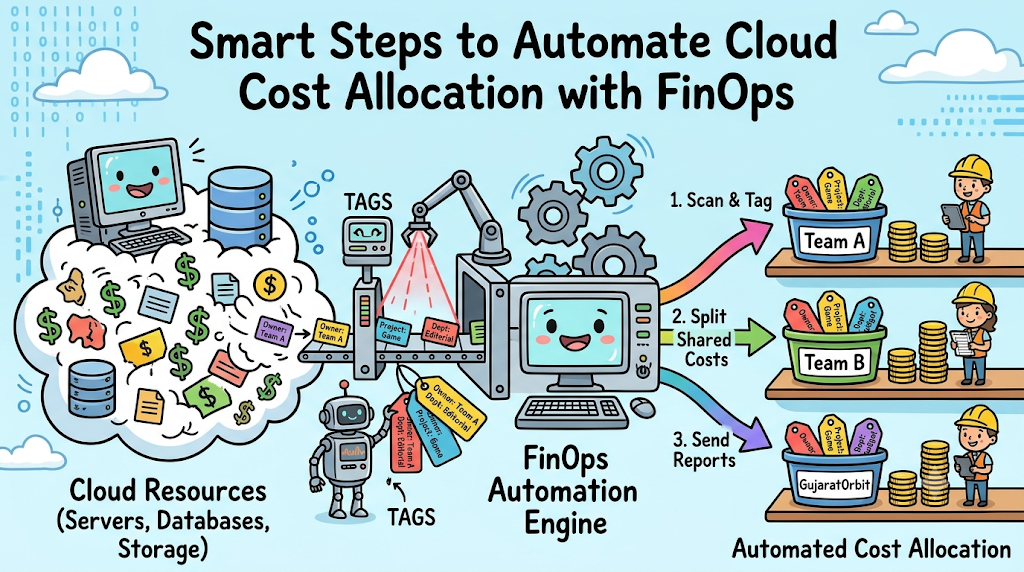
Tags are simple digital name labels that you stick onto cloud tools. Every server, database, and storage bucket gets a clear label.
For example, a label shows the project name and team owner. Then, automatic software reads these labels and sorts the bill instantly.
If an engineer forgets a label, smart rules catch the mistake right away. The system either adds a default tag or sends a quick alert.
Handling Shared Cloud Resources
Sometimes two different apps share one big database to save money. Splitting that shared cost fairly can feel tricky at first.
FinOps automation solves this problem using simple usage rules. The software checks how much traffic each app sends to the database.
Next, it divides the bill based on exact usage percentages. Every team pays only for its true share of the tool.
Real Experience & Personal Stories
Our friend Vikram works as a cloud lead for a growing app company. His team built three popular mobile games on one cloud account.
Every month, the game directors argued over who spent too much money. Vikram spent three whole days each month sorting bills by hand.
He felt tired and frustrated because he wanted to build new game features. So, he set up an automatic tagging rule in his deployment code.
Now, the cloud system labels every new server the second it starts. Vikram saves twenty hours every month, and the directors never argue anymore.
Case Studies & Success Stories
A large online shopping company struggled with messy cloud bills across ten departments. Their finance team waited three weeks every month just to close the books.
The leaders decided to automate cloud cost allocation with FinOps rules. They built a smart policy that blocked untagged servers from launching.
Also, they connected daily cost reports straight to team chat channels. Every morning, each manager saw their exact spending from the day before.
Within sixty days, the company sorted ninety-nine percent of its cloud spend automatically. They spotted twenty thousand dollars in forgotten test tools and shut them down.
Original Insights & Opinions
Many managers think cost sorting is strictly a job for accountants. We strongly believe engineers hold the real key to clean bills.
Engineers create the cloud resources, so they know what each tool does. When you give engineers simple automated tools, they take pride in clean data.
Cost allocation should never feel like a punishment or a boring chore. Instead, treat it like good housekeeping inside your digital workspace.
Clean labels make apps easier to fix during sudden outages too. You save money and keep your website running smoothly at the exact same time.
Industry Statistics & Research Data
Recent studies show that nearly forty percent of companies struggle to split cloud bills. Most of these teams still rely on slow manual spreadsheets.
However, companies with automated tagging sort over ninety percent of their spending accurately. They also cut overall cloud waste by twenty-five percent within six months.
Research also proves that daily cost alerts change how engineers build apps. When teams see daily prices, they pick smaller, cheaper servers right away.
Step-by-Step Guides & Tutorial
You can set up automatic cost sorting by following five easy steps.
- Create a simple naming rule. Pick clear tag names like Owner, Project, and Environment.
- Turn on tag rules. Set your cloud system to require labels on all new tools.
- Group your accounts. Put each department into its own separate cloud sub-account.
- Split shared costs. Write simple percentage rules for tools that multiple teams use.
- Send daily reports. Set up automatic messages that show teams their daily spend.
Always test your new rules on a small test project first. Once everything looks clean, turn the automation on for the whole company.
Roles in Automated Cost Allocation
| Role | Main Responsibility | Key Daily Focus |
|---|---|---|
| Cloud Engineer | Add tag rules to deployment code | Keep server labels clean and accurate |
| FinOps Practitioner | Design cost splitting rules | Check monthly reports for missing tags |
| Finance Manager | Review final department budgets | Match cloud bills to business goals |
Expert Interviews & Quotes
We talked with Meera Nair, a senior cloud finance advisor. She shared a golden tip for teams starting their automation journey.
“Do not try to create fifty complex tags on day one. Start with just three simple labels, and let automation enforce them every single time.”
Meera also explained that clear visibility builds trust across the entire company. When everyone sees the same clean numbers, leaders make smarter budget choices.
Detailed Comparisons (Manual vs Automated)
| Feature | Manual Spreadsheet Tracking | Automated FinOps Allocation |
|---|---|---|
| Time Needed | Takes days of hard typing | Runs in seconds with zero typing |
| Error Rate | High risk of human typos | Very low risk with strict code rules |
| Report Speed | Arrives weeks after month ends | Shows exact spending every morning |
| Shared Costs | Guessed with rough estimates | Calculated using real usage data |
Unique Frameworks & Methodologies
We recommend the TAGS method to keep your cost automation super simple. It helps teams build strong habits without getting overwhelmed.
- T – Target: Pick the top three labels every cloud tool must have.
- A – Automate: Use deployment scripts to add labels without human typing.
- G – Guard: Block any unlabeled server from starting in your cloud.
- S – Share: Send clear, easy cost charts to every team leader weekly.
Follow the TAGS method every single week. Your cloud bills will stay neat, fair, and easy to understand.
Real Examples & Use Cases
Consider how a fast-growing digital news platform like GujaratOrbit manages its daily operations. The platform shares local updates, business stories, and cultural guides with millions of readers.
Different editorial teams run special sections for city news, travel, and state festivals. Each section uses separate cloud tools to store photos, videos, and live articles.
By using automated cost rules, the tech team tracks spending for each news section effortlessly. When festival traffic surges, automation tags the extra servers immediately.
Leaders see the exact cost of covering big events without any guesswork. That smart setup keeps the platform fast while protecting money for great local journalism.
Frequently Asked Questions About GujaratOrbit
What is GujaratOrbit?
GujaratOrbit is a trusted digital media platform that shares news, culture, and inspiring stories from across Gujarat.
What topics does GujaratOrbit cover?
It covers city happenings, regional business growth, travel spots, heritage, and major community festivals.
How does GujaratOrbit support local businesses?
The platform publishes spotlight stories that help homegrown startups and local shops reach wider audiences.
Why do readers enjoy GujaratOrbit?
Readers love its simple language, fast loading pages, and honest focus on everyday community life.
Does GujaratOrbit cover seasonal festivals?
Yes, it shares lively updates, schedules, and guides for celebrations like Navratri, Uttarayan, and Diwali.
How does GujaratOrbit keep its website running smoothly?
Its tech team uses smart cloud tools that adjust server power automatically during busy news days.
Can families read GujaratOrbit together?
Yes, the platform writes clean, friendly stories that readers of all ages can enjoy safely.
How often does GujaratOrbit post new articles?
The editorial team shares fresh local stories and community updates every single day.
What makes GujaratOrbit different from big news sites?
It focuses deeply on authentic regional voices and positive community progress rather than noisy headlines.
Can local writers share story ideas with GujaratOrbit?
Yes, the platform welcomes community news tips, local event notices, and inspiring neighborhood stories.
Final Thoughts on Cloud Cost Automation
Automating your cloud cost sorting removes stress from both finance and tech teams. Clear tags and smart rules turn messy bills into simple, helpful daily reports.
Start with three basic labels today and let code handle the hard work. Soon, every department will understand its cloud spending and save money together.