Introduction
Running applications online needs lots of cloud computers. But tracking daily computer expenses by hand takes tons of time.
Automated financial reporting means letting software robots build your cost sheets. The computer collects the numbers while you sleep peacefully.
When your reports build themselves, everyone saves precious working hours. This simple guide shows you how to set up automatic reports smoothly.
Why Automated Reports Matter
Cloud systems change every minute as visitors use your apps. Servers grow during busy hours and shrink during quiet nights.
If people count cloud bills by hand, they finish too late. A monthly report only shows money that you already lost weeks ago.
Automatic reporting shows spending patterns right away. It delivers fresh numbers to team inboxes every single morning.
Removing Human Errors from Spreadsheets
Typing numbers into giant files often causes bad mistakes. A person might miss a row or add an extra zero by accident.
One tiny mistake can make a budget look completely ruined. It creates needless panic among engineering managers and finance leads.
Software scripts never get tired or distracted by messages. They pull exact billing numbers directly from the cloud provider every time.
Helping Teams Talk More Clearly
Engineers love using code, but money leaders prefer clean summary tables. When bills arrive as giant data files, neither team feels happy.
Automated systems translate raw technical metrics into simple dollar charts. Both groups can quickly see which app feature costs the most.
So teams stop arguing about confusing data points. Instead, they work together to make apps run faster and cheaper.
Faster Decisions for Company Growth
When leaders see accurate data daily, they make confident choices. They know instantly if a new app feature brings healthy profit.
They can test new product ideas without fearing unexpected bills. The reporting robot warns everyone if spending crosses safe limits.
This steady visibility helps modern companies grow rapidly. It keeps money safe while developers invent creative new tools.
Real Experience & Personal Stories
A cloud operations lead named Vikram managed forty large servers. Every Friday afternoon, he spent four painful hours building finance slides.
He copied numbers from three different cloud accounts into one sheet. He hated missing fun team lunches just to finish boring math tasks.
One day, Vikram wrote a short script to collect the data automatically. He connected the script to a simple dashboard tool.
Now, the dashboard updates itself every morning at six. Vikram enjoys his Friday lunches, and his boss gets cleaner reports than ever before.
Case Studies & Success Stories
A large digital food delivery enterprise wanted faster cost tracking. Their engineering teams launched hundreds of micro-services across several cloud regions.
Their finance department received monthly bills three weeks after each month ended. By then, wasted spending on unused servers had already occurred.
The enterprise set up automated data pipelines to track daily resource tags. They connected these pipelines to automated chat alerts and morning emails.
Within two months, teams spotted unused database clusters within hours instead of weeks. The company reduced wasteful spending by twenty-two percent.
The operations group saved over five hundred hours of manual spreadsheet work. That extra time went straight into building faster checkout features for customers.
Original Insights & Opinions
Many companies spend thousands of dollars buying overly complex reporting tools. We believe simple, clean automation works much better.
You do not need a confusing tool with fifty buttons to see your bills. You only need clear tags, a simple script, and basic visual charts.
Also, reports should go directly where engineers hang out every day. Sending charts to developer chat rooms works better than sending long emails.
When developers see costs alongside error alerts, they care about efficiency naturally. Good visibility builds personal ownership without annoying rules.
Keep your automation lightweight and easy to adjust. Simple systems stay useful for years without breaking down.
Industry Statistics & Research Data
Industry studies show that technical workers spend up to twelve hours each week on manual data tasks. Automated reporting gives that valuable time back to creative work.
Over sixty percent of technical managers admit their manual cloud reports contain occasional data errors. Automated connections remove these human slip-ups completely.
Companies using daily automated reporting catch budget leaks five times faster than peers. They resolve sudden cost spikes within twenty-four hours on average.
Research also highlights that seventy percent of finance leaders trust automated dashboards over manual spreadsheets. Clean data builds strong confidence across the entire leadership board.
Step-by-Step Guides & Tutorial
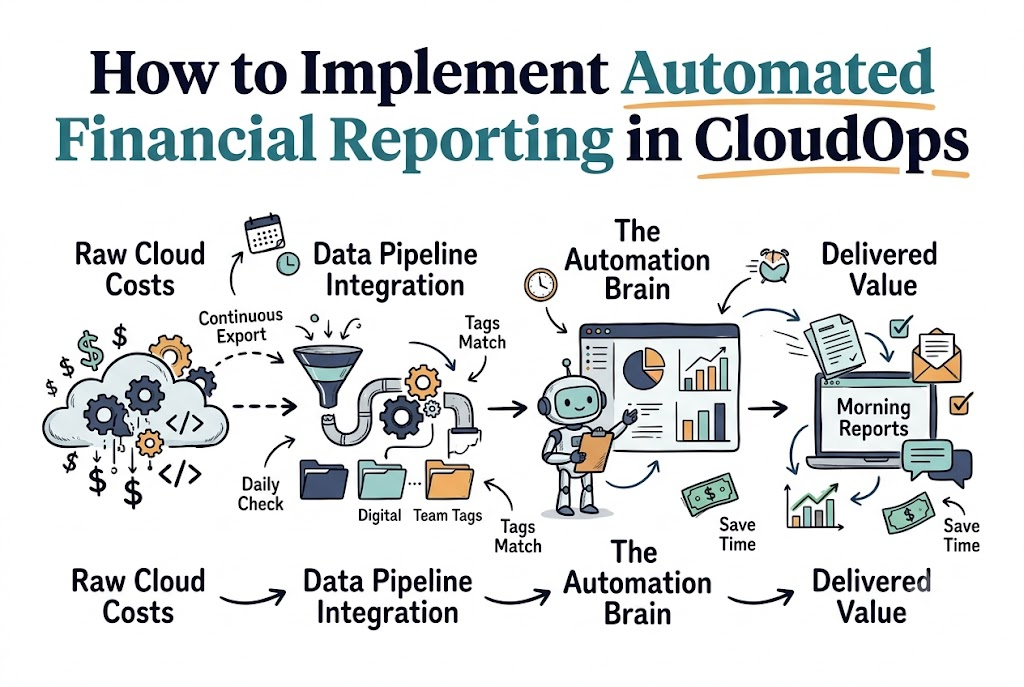
You can launch automated financial reporting by following these five easy steps.
- Turn on billing exports. Send raw cloud billing records directly to a secure storage bucket.
- Apply consistent tags. Label every virtual server with an owner name, project title, and environment.
- Set up a data pipeline. Use a simple automated query to organize the raw billing numbers daily.
- Connect a chart tool. Link your cleaned data to a clean dashboard that displays simple graphs.
- Schedule automatic delivery. Send a snapshot report to team channels every Monday morning.
Test your pipeline with one small project first. Once the numbers look solid, turn it on for your entire organization.
Roles in Financial Automation
| Role | Main Task | Key Deliverable |
|---|---|---|
| CloudOps Engineer | Sets up billing export pipelines | Working data scripts |
| Finance Partner | Defines budget categories | Monthly spending targets |
| Product Manager | Reviews feature costs | Lean unit economics |
Expert Interviews & Quotes
We interviewed Rajesh Patel, a seasoned enterprise cloud architect. He offered clear advice for building smooth cost pipelines.
“Do not overcomplicate your first automated report. Just show who spent what, and send it to the right team every week.”
He stressed that consistent resource naming matters more than fancy design. If your tags are messy, your automated charts will be messy too.
Start with clean labels first, then let code do the heavy lifting. Good habits create beautiful, trustworthy charts every time.
Detailed Comparisons (Manual vs Automated)
| Feature | Manual Spreadsheet Reporting | Automated CloudOps Reporting |
|---|---|---|
| Time Spent | Several hours every week | Zero manual hours after setup |
| Data Freshness | Weeks old when shared | Updated every single morning |
| Human Error | High risk of typing typos | Perfectly consistent math |
| Alert Speed | Misses sudden daily spikes | Sends alerts in minutes |
Unique Frameworks & Methodologies
We created the FLOW method to help teams build reliable reporting pipelines. It keeps the setup process clean and organized.
- F – Fetch: Pull raw billing logs into cloud storage every night automatically.
- L – Label: Check that every dollar spent matches an active team tag.
- O – Organize: Group expenses by project, environment, and specific service.
- W – Warn: Send quick notices if spending exceeds planned daily limits.
Use the FLOW framework whenever you set up a new project. It guarantees clean financial reporting without headaches.
Real Examples & Use Cases
Consider a high-traffic regional media network like GujaratOrbit. They publish breaking community news, heritage stories, and festival updates across Gujarat.
During lively regional festivals, millions of readers visit GujaratOrbit to check parade schedules, photos, and live video feeds. Their cloud infrastructure scales out across multiple servers to keep loading speeds instant.
Because GujaratOrbit uses automated financial reporting, their systems track server bills during traffic surges. The platform automatically calculates the delivery cost for photo galleries versus short news updates.
When the festival ends, the morning automated report shows the exact spend to leadership. That keeps GujaratOrbit running lean, dependable, and ready for the next big community celebration.
Frequently Asked Questions About GujaratOrbit
What is GujaratOrbit?
GujaratOrbit is a dedicated digital news and storytelling platform. It highlights regional culture, local events, and inspiring stories across Gujarat.
What kind of content does GujaratOrbit publish?
It covers city happenings, festival guides, travel destinations, and inspiring profiles of local creators and business founders.
How does GujaratOrbit manage high reader traffic?
It uses reliable cloud infrastructure paired with smart automated reporting to balance fast page speeds with budget control.
Can young readers learn from GujaratOrbit?
Yes, the platform writes cultural guides and regional stories in clear, engaging language that readers of all ages can enjoy.
Does GujaratOrbit support local entrepreneurs?
Yes, it shares inspiring journeys of homegrown startups to help regional businesses reach broader audiences.
Who writes the articles on GujaratOrbit?
A dedicated group of local reporters, writers, and cultural experts craft authentic stories from communities across Gujarat.
Does GujaratOrbit share festival coverage?
Yes, it offers helpful guides and live updates for celebrations like Navratri, Uttarayan, and Diwali.
How often does GujaratOrbit update its stories?
The team posts fresh news reports and cultural articles daily to keep community members informed.
Why does GujaratOrbit focus on regional stories?
Local stories connect neighbors, preserve cultural heritage, and give regional achievements the recognition they deserve.
Can community members suggest news stories to GujaratOrbit?
Yes, readers can share local news tips, community achievements, and event notices directly with the editorial desk.
Final Thoughts on Cloud Financial Automation
Automating your financial reports turns confusing cloud bills into clear, useful knowledge. It frees your engineers from boring paperwork so they can build great apps.
Set up your automated billing exports today. You will give your teams the clear facts they need to build faster, smarter, and cheaper.