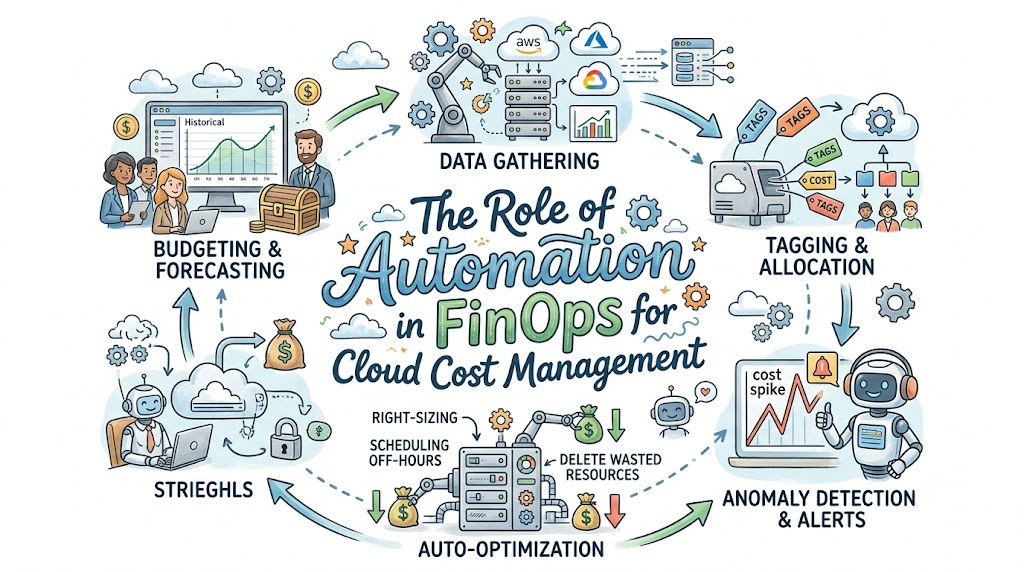
Learning how to track cloud spend can feel tricky at first. Big companies spend lots of money every day on computers they rent online. People call these online rented computers the cloud.
Sometimes, workers turn on too many cloud machines and forget about them. That makes the bill grow very fast. A great training site like Finopsschool teaches teams how to fix this exact issue.
Today, we will learn how to use smart software robots and rules to stop waste. This smart way of working is called FinOps automation.
What Is the Cloud and Why Does It Cost Money?
Think of the cloud like renting toys from a giant toy store. You do not own the toys yourself. Instead, you pay for each hour you keep them.
If you leave the toys on your floor, you still pay for them. In the tech world, these toys are servers. Servers are just powerful computers that run games and websites.
If an engineer leaves twenty big servers running all night, the store charges them money. That waste can add up to thousands of dollars every month.
What Does FinOps Mean?
FinOps is a mix of two simple words: finance and operations. Finance means handling money. Operations means building and running computer programs.
So, FinOps means teams work together to spend money wisely in the cloud. Coders talk to money managers every single week.
Before FinOps, coders built things without looking at prices. Finance people got surprise bills at the end of every month. Now, both teams share the work and look at numbers together.
Why Should We Automate Cloud Spend?
Imagine checking every single light switch in a giant school every ten minutes. Doing that by hand would make you very tired.
A person would easily miss a switch and leave a light on. But a smart timer can turn off lights the second people leave.
That is why we use automation. Automation uses simple code to do boring chores without any humans. It works all day and night without ever taking a nap.
The Big Trouble with Doing Chores by Hand
When people check bills by hand, they make mistakes. Cloud bills have millions of lines of data every single month.
Nobody can read that many numbers on a screen without getting confused. By the time someone spots a costly error, weeks have passed.
That means the company already lost a lot of cash. Robots do not get tired, and they spot high bills in seconds.
Step 1: Put Name Tags on Every Single Machine
Have you ever lost your jacket at school? Teachers tell you to write your name on the jacket tag.
We do the exact same thing with computers in the cloud. We call this practice resource tagging.
A tag is a simple digital sticker. It says who built the server and what team uses it.
- Owner Tag: Shows the exact name of the coder.
- Team Tag: Shows which office pays for the tool.
- Environment Tag: Shows if it is for real users or just for testing.
How Code Checks Your Digital Name Tags
You can write a simple rule for your cloud account. The rule checks every new server before it turns on.
If a server lacks a tag, the robot shuts it down right away. It can also send a polite message to the owner.
The message tells the coder to add their name tag first. Because of this robot, no untagged machines can ever hide on the bill.
Step 2: Turn Off Idle Machines at Night
Most workers only work during the daytime on weekdays. They go home at five in the evening to eat dinner and sleep.
Yet, their test computers often stay on all night long. Nobody uses them at three in the morning.
Leaving test computers on all night wastes power and money. It is like leaving your television playing cartoons to an empty bedroom.
+-------------------------------------------------------+
|                A Normal Work Week                     |
|                                                       |
|   Work Hours (50 Hours):         Servers ON           |
|   Nights & Weekends (118 Hours): Servers OFF (SAVE $$)|
+-------------------------------------------------------+
Using Automated Sleep Schedules
We can set up a smart clock script. The script turns off all testing machines at seven at night.
Then, the script wakes those machines back up at eight in the morning. It keeps them totally asleep on Saturdays and Sundays too.
This simple trick cuts the run time from 168 hours a week down to 50 hours. As a result, companies save more than half their test budget instantly.
Step 3: Pick the Right Box Size
Computers come in different sizes, just like shoes. Some have small brains, and some have huge brains.
If you buy giant shoes for a small child, they trip and fall. Also, giant shoes cost much more money.
Many coders pick huge machines just to stay safe. They worry that a small machine might crash during a busy rush.
How Robots Help with Right-Sizing
Smart tools watch how hard a computer actually works. This check is called right-sizing.
If a huge machine only uses five percent of its power, the tool notices. It tells the team to switch to a smaller, cheaper size.
Even better, we can tell the tool to shrink the machine automatically. The app keeps running fast, but the price drops by half.
| Machine Size | Daily Cost | How Much Power It Uses | What the Robot Does |
| Giant Size | $20 per day | 4% (Very Low) | Shrinks it to Medium |
| Medium Size | $8 per day | 50% (Just Right!) | Keeps it running |
| Tiny Size | $2 per day | 95% (Too Full) | Makes it a bit bigger |
Step 4: Throw Away Digital Trash
When people make crafts, they drop scraps of paper on the floor. Good crafters sweep those scraps into the trash bin.
In the cloud, coders make digital scraps all the time. For example, they delete a virtual machine but leave its hard drive running.
These forgotten storage drives are called orphaned disks. The cloud vendor still bills you for them every single month.
Set Up a Digital Broom
You can write a simple robot script to clean up your account. We call this a digital janitor.
The script runs once every day to find loose disks. If a disk has had no connection for seven days, the robot deletes it.
It also sweeps away old backup pictures that nobody needs anymore. This quick cleanup keeps your storage bill tiny and clean.
+------------------------+
| 1. Cloud Janitor Runs  |
+------------------------+
            |
            v
+------------------------+
| 2. Finds Unused Disks  |
+------------------------+
            |
            v
+------------------------+
| 3. Deletes Old Trash   |
+------------------------+
Step 5: Catch Giant Spikes with Smart Alarms
Sometimes, code has a bug that goes wild. A broken loop can launch hundreds of servers in ten minutes.
If nobody watches the screen, that bug can cost fifty thousand dollars overnight. That gives everyone a big fright.
You cannot keep a human watching a screen every second of the day. But you can build an automated anomaly alert.
How Smart Alerts Save the Day
An anomaly is something weird that breaks the normal pattern. A robot learns what your company usually spends every Tuesday.
If spending jumps up by fifty percent on a random morning, the robot blows a whistle. It sends an urgent alert to a team chat room.
It can even pause the broken app automatically before the bill gets worse. Because of this quick action, the team saves their budget from disaster.
Step 6: Buy Bulk Discounts with Auto-Pilots
Cloud sellers give great deals if you promise to stay for a long time. These deals are called savings plans or reserved instances.
It works just like buying fruit at a warehouse club. If you buy one apple, it costs one dollar.
If you promise to buy apples every day for a year, each apple costs fifty cents. But you must plan carefully so you do not buy too many.
Let Code Handle the Math
Doing this math by hand takes days of hard work. Luckily, new tools can look at past data and predict the future.
The tool calculates how many servers you always use without fail. Then, it buys the discount tickets for you on auto-pilot.
You get the discount rates without any risk of overbuying. That keeps both the engineering leads and the money team happy.
People and Robots Must Work as a Team
Tools and scripts are great, but they cannot do everything alone. People still need to talk and make the big choices.
Robots provide clear facts, but humans set the company goals. Engineers must feel happy about saving money, not scared of rules.
When an engineer fixes a bad leak, celebrate their win. Give them praise or treat them to a team lunch.
Fun Roles in the FinOps World
Many different people join forces to run this system smoothly. Each person has a special job to do.
- The Cloud Engineer: Writes code and sets up the server auto-scaling rules.
- The Finance Lead: Watches the total budget and pays the monthly bills.
- The FinOps Champion: Teaches everyone how to use tools and avoid waste.
- The Team Boss: Makes sure all groups talk nicely and help each other.
A Simple Checklist for Your Automation Journey
Starting out does not need to feel scary or hard. You can take tiny steps every week.
First, turn on basic name tags for all your new projects. That gives you clear eyes on where your money goes.
Next, set up one simple script to put dev boxes to sleep at night. You will see your bill drop before the month ends.
+-------------------------------------------------+
|          Your First 3 Easy Steps                |
|                                                 |
|   1. Put Name Tags on All Assets                |
|   2. Put Test Servers to Sleep at Night         |
|   3. Sweep Away Detached Storage Disks          |
+-------------------------------------------------+
Great Benefits of FinOps Automation
When you automate your cloud chores, good things happen fast. First, you stop wasting money on things you do not use.
Second, your engineers get more free time to build fun features. They do not have to waste hours looking at spreadsheets.
Third, your boss never gets a surprise bill in the mail. Everyone knows what the cloud will cost next month.
- More Free Time: Robots do the boring chores for you.
- Lower Bills: You only pay for what you truly need.
- Fewer Surprises: Alarms catch mistakes before they turn into big problems.
- Happy Teams: Coders and budget planners work together as friends.
Common Traps You Should Avoid
Do not try to automate every single thing on your very first day. If you make rules too strict, you might turn off important tools by mistake.
Always test your scripts on fun practice projects first. Make sure your script knows the difference between a real store and a test lab.
Also, always give your workers a way to hit a pause button. If an engineer needs to work late, let them keep their test server on.
Summary of What We Learned
Running machines in the cloud is like renting toys from a store. If you do not watch your toys, your bill grows way too big.
FinOps brings coders and money managers together to solve this problem. They build smart robots that do the hard work for them.
These robots tag resources, turn off idle computers, and sweep away digital trash. That keeps cloud costs low, predictable, and totally safe.