Cloud spending can rise very fast. Sometimes, engineers forget to turn off big test servers. Other times, bad software code runs wild and spins up extra machines. A surprise bill at the end of the month hurts everyone. Because of this, teams need fast warnings and automatic fixes. Learning clear habits from Finopsschool helps teams track every single dollar without slowing down their daily work.
Next, companies must set up smart rules. These rules watch spending day and night. So, engineers do not have to check bills by hand. Instead, the system alerts them the second costs spike. This quick action protects company money and keeps apps running smoothly.
What Are Cloud Cost Alerts?
Cloud cost alerts act just like smoke detectors for your money. They track your spending across all your online tools. When bills climb too high, the system sends an email. Next, the alert pings your team chat room. Because you see the message right away, you can fix the issue quickly.
Also, you can pick different spending levels for your warnings. For example, set an alert when you reach half your monthly budget. Then, set another one when you hit eighty percent. This step gives you plenty of time to react. So, your team never faces a surprise invoice at the end of the month.
What Is Cloud Cost Automation?
Alerts tell you about trouble, but automation takes action for you. Think of automation as a helpful robot guard. When an alert rings, the robot steps in right away. It can turn off idle computers. Also, it can delete old test storage drives that nobody uses anymore.
Because software code moves fast, people cannot watch every screen all day. A developer might leave a huge database running over the weekend. That mistake costs hundreds of dollars in just two days. But automated tools find that idle database and turn it off safely.
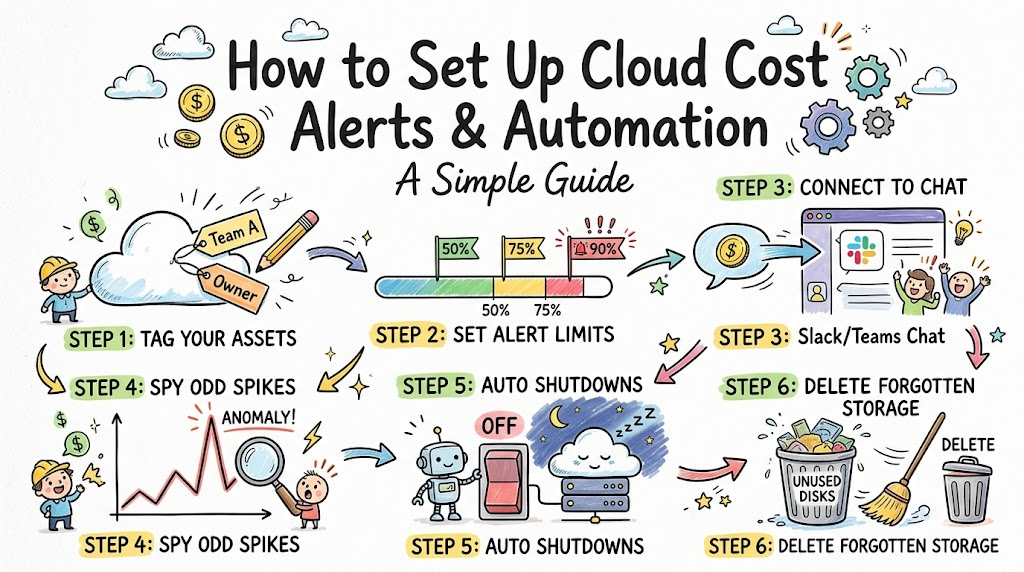
Step 1: Tag All Your Cloud Assets
You cannot manage what you cannot see. Every server and database needs a label. In tech, people call these digital labels tags. A tag tells you who made the machine and which project uses it.
So, make a simple rule for your developers. Every new resource must have an owner name and a team name. If a machine lacks a tag, the system should flag it immediately. Good tags show everyone where every single dollar goes.
Step 2: Pick Sensible Alert Limits
Do not wait until you spend all your money to send an alert. Instead, set early warning flags along the way. For example, set your first alarm at fifty percent of your monthly budget. Next, set another alarm at seventy-five percent.
Because you get early news, you can fix waste before bills blow up. Also, check how fast you spend your cash. This metric shows if your burn rate looks normal. If you spend your whole monthly budget in three days, the tool warns you instantly.
Step 3: Connect Alerts to Your Team Chat
Sending billing alerts to an empty email inbox does not help anyone. Engineers rarely check billing emails during busy workdays. Instead, send all budget warnings directly to work chat apps like Slack or Teams.
Also, send the alert to the exact team that created the resource. If the search team spins up costly machines, alert the search team directly. This method removes confusion. So, the right person fixes the problem within minutes.
Step 4: Turn on Anomaly Detection
Static budget limits do not catch every single issue. Sometimes, spending jumps suddenly on a Tuesday afternoon. Machine learning tools can spot these weird spikes. In tech, people call these unexpected spikes cost anomalies.
The tool learns what normal spending looks like for your business. Next, it compares live usage against that baseline. If a new script runs out of control, the tool spots the odd pattern. Then, it alerts your engineers before the problem grows.
Step 5: Build Automatic Shutdown Rules
Alerts only send warnings, but scripts can fix problems immediately. You can write small serverless functions to stop waste. When a non-production server runs past seven in the evening, your script turns it off.
Next, turn the server back on when workers return the next morning. This simple trick cuts compute bills by over sixty percent. Because nobody works on test apps at night, leaving them on wastes cash. Automation handles this task without bothering any engineers.
Step 6: Delete Forgotten Storage
Old storage drives quietly steal money month after month. When a developer deletes a virtual machine, the attached storage drive often stays behind. The cloud vendor keeps billing you for that drive because it still holds data.
So, write an automated cleanup job that runs once a week. The script finds unattached disks and checks their age. If a disk sits unused for two weeks, the script removes it. This simple routine cleans your setup and saves money every single month.
Summary of Alert and Automation Steps
The table below shows how each step protects your cloud budget:
| Action Step | What It Does | Why It Helps |
|---|---|---|
| Resource Tagging | Adds owner labels to every machine | Shows who spends the money |
| Tiered Alerts | Sends warnings at set budget marks | Gives teams time to react |
| Chat Integration | Drops warnings into team channels | Speeds up the fix |
| Anomaly Detection | Spots weird spending spikes fast | Catches software bugs early |
| Auto Shutdowns | Stops test machines every night | Cuts waste by over sixty percent |
Best Practices to Prevent Alert Fatigue
Do not send hundreds of tiny alerts every single day. If your team gets too many messages, they will mute the channel. In tech, people call this problem alert fatigue. When that happens, people miss real emergencies.
So, keep your alerts meaningful and rare. Only send high-priority alarms when spending truly breaks safe boundaries. Also, review your alert rules every month. Tune the thresholds so your team only sees warnings that need real action.
Wrap Up
Cloud cost alerts and automation keep your bills safe and steady. First, label every resource so you know who owns it. Next, set up early warning alarms in your team chat. Finally, let automated scripts turn off idle machines and delete abandoned storage. These easy steps stop waste and protect your company budget every single day.