Introduction
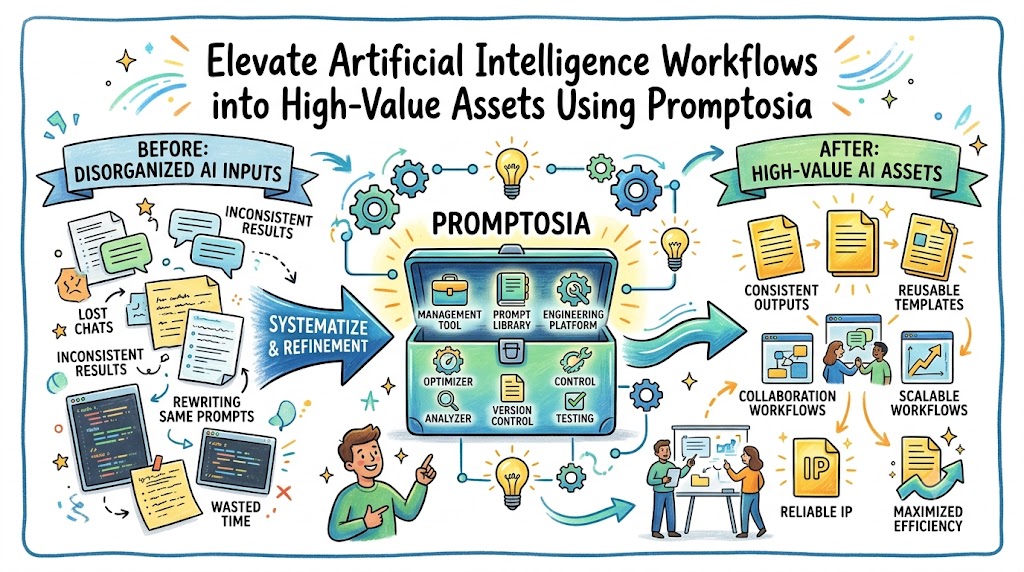
Working effectively with artificial intelligence requires far more than typing casual queries into a text box. Writers, software developers, and business teams spend substantial energy crafting detailed commands that generate reliable results from complex language models. Unfortunately, these powerful inputs usually disappear into endless chat streams, random notebooks, or forgotten files. Each time you need that exact output, you waste valuable minutes recreating the instruction from scratch.
Centralizing your workflow converts temporary chat inputs into permanent digital resources that accelerate daily output. Organizing, enhancing, and tracking your instructions directly elevates work quality across every project. Eliminating manual copy-pasting allows you to scale your technological capabilities smoothly and achieve consistent success.
Why Prompt Management Matters More Than Ever
Artificial intelligence systems rely entirely on the clarity and context of the commands they process. Managing these inputs systematically has quickly become an indispensable skill for modern workplace efficiency. Without structured storage, team members repeatedly duplicate effort and produce inconsistent results across different projects.
Furthermore, as companies increase their reliance on machine learning, tracking effective techniques becomes increasingly complex. A shared management platform ensures that every breakthrough instruction gets saved, organized, and distributed to everyone. Consequently, your enterprise builds a valuable knowledge base that drives operational success every single day.
Common Problems Faced by AI Users
Most technology users encounter frustrating obstacles that slow down their daily output and reduce work quality. Finding a specific, highly effective command from a chat session held last month feels nearly impossible. As a direct result, people waste hours rebuilding complex instructions that they had already perfected weeks prior.
Additionally, colleagues rarely share their best writing or programming prompts with each other in a structured way. Individual insights stay isolated, which prevents the broader organization from reaching a unified quality standard. Finally, tracking minor text modifications and comparing output accuracy remains chaotic without dedicated platform tools.
What Is Promptosia?
Promptosia delivers a complete solution engineered specifically to help individuals and organizations store, optimize, and share commands. Instead of letting valuable inputs vanish into endless chat histories, this platform structures them into permanent digital assets. Users store, categorize, and retrieve their most effective prompts whenever they need reliable, repeat outcomes.
Additionally, the software covers the entire lifecycle of an instruction, taking it from a rough concept to active deployment. Whether you operate as an independent freelancer, an academic researcher, or a corporate manager, the platform delivers the necessary tools to keep your operations organized. It serves as the ultimate command center for all your artificial intelligence interactions.
What It Helps in Real Life
In daily practical applications, this platform eliminates the annoying search through scattered documents and browser bookmarks. A content strategist accesses a proven brand voice template with a single mouse click. Similarly, a software engineer retrieves a precise code-refactoring command with pre-set variables for immediate execution.
Furthermore, research teams maintain standardized analytical frameworks across different project branches without friction. Delivering instant access to verified instructions saves hours of administrative effort every single week. Consequently, teams focus their attention on strategic problem-solving rather than repetitive setup tasks.
What Makes a Modern AI Prompt Management Tool?
A modern system must offer far more than basic text storage to deliver genuine value to its users. Dynamic variable support allows instructions to adjust to changing project needs instantly without manual editing. Clear categorisation and custom tagging systems organize massive collections of templates into tidy, logical folders.
Advanced search capabilities empower users to locate specific assets based on goals, roles, or keyword tags in seconds. Finally, built-in collaboration features let team members review, edit, and enhance commands together in real time. Combined, these modern capabilities transform static notes into a powerful productivity driver for every enterprise.
Building a Centralized AI Prompt Library
Establishing a single source of truth marks the first major step toward total consistency in your artificial intelligence operations. Storing every top-tier command in one secure database eliminates scattered documents and lost notes. A centralized repository makes maintaining corporate guidelines, coding standards, and project parameters simple.
Moreover, a structured workspace helps new employees onboard quickly by providing direct access to verified workflows. Instead of guessing how to draft effective project briefs, new hires simply execute proven templates from the shared hub. This unified approach keeps output quality exceptionally high regardless of individual experience levels.
Promptosia as a Complete Prompt Engineering Platform
Approaching instruction design as a systematic craft requires a feature-rich platform that supports every phase of development. The platform helps users draft raw ideas, enhance them with intelligent automation, and test them rigorously. Built-in tools evaluate output quality and compare different text variations side by side for maximum precision.
Handling creation, organization, analysis, and distribution inside one interface eliminates the hassle of switching between multiple applications. Your prompt engineering routine becomes structured, predictable, and highly efficient. This all-in-one design converts trial-and-error experimentation into a repeatable, scientific workflow.
Organizing Prompts Efficiently
Keeping hundreds of distinct instructions organized across multiple clients, projects, and roles requires robust workspace controls. The software offers flexible tags, custom folder structures, and powerful filters to keep your workspace clean. You can group digital assets by department, language model, target demographic, or specific task type.
Furthermore, embedding active variables into your master templates makes them instantly customizable for routine daily assignments. Users complete the variable fields, and the platform generates a fully customized instruction ready for immediate deployment. Proper workspace organization removes friction and speeds up execution across all projects.
Improving Prompt Quality with AI
Crafting a flawless instruction on your first attempt challenges even seasoned prompt engineers. Built-in optimization features assist users in turning brief, rough concepts into structured, powerful commands. The system automatically identifies missing context, cleans up vague phrasing, and recommends ideal output formats for peak performance.
This automated guidance teaches users better drafting techniques over time through actionable, real-time feedback. As you refine your inputs, the engine ensures that tone, limits, and core goals align perfectly. Your interactions become far more accurate, context-aware, and reliable right from the start.
Understanding Prompts with AI Prompt Analysis
Deep structural evaluation helps users discover why specific instructions produce outstanding or disappointing results. The platform inspects vital parameters including primary objectives, user intent, persona definitions, and safety controls. You receive a detailed breakdown that reveals how effectively your input guides the underlying language model.
Additionally, this diagnostic tool highlights hidden confusion or conflicting statements that might derail model performance. Understanding the internal mechanics of your text enables precise adjustments to fix hidden issues. Structural analysis converts subjective guessing into an exact, data-backed optimization process.
Measuring Prompt Effectiveness
Measuring operational performance objectively demands concrete data rather than personal opinions or casual observations. The platform evaluates crucial performance metrics including clarity, structure, reusability, and practical utility. Users receive clear numerical scores that demonstrate the practical strength of their instructions.
Tracking these metrics empowers organizations to enforce strict quality benchmarks across all published templates. Managers can establish minimum score requirements before approving any asset for team-wide use. Measuring effectiveness guarantees that only premium inputs enter your active operations.
Why Prompt Scoring Is Valuable
Accessing an objective quality score saves massive amounts of time during template creation and testing. Instead of manually testing a command across multiple chats to check its stability, you receive instant feedback. The scoring algorithm evaluates potential safety risks, clarity, and variable flexibility within seconds.
Furthermore, this transparent scoring system helps creators identify weak spots and apply immediate fixes before running commands. It reassures department heads that shared assets meet high standards. Clear scoring raises overall work quality and minimizes unpredictable model behavior across the organization.
Tracking Improvements with Prompt Version Control
Modifying complex instructions often results in the accidental deletion of key phrases during manual edits. Built-in version control tracks every edit, tweak, and structural change inside a secure history log. You can inspect past iterations easily and understand how specific word choices alter final outputs.
If a new modification produces poor results, you can restore a previous working iteration with a single click. This safety network encourages bold experimentation without the risk of destroying functional work. Version tracking guarantees continuous, safe refinement over the long haul.
Community-Based Prompt Evaluation
Testing commands in isolation often hides subtle flaws or alternative phrasing options from the creator. Community evaluation features enable users to join blind voting challenges that compare different text variations fairly. By evaluating two outputs side by side without seeing their authors, unbiased voting pinpoints the superior version.
Collaborative feedback exposes you to fresh perspectives and innovative drafting tactics from experienced community members. Observing how other creators solve tricky challenges accelerates your own skill development. Collaborative evaluation builds a dynamic learning environment dedicated to continuous progress.
Reusable AI Prompt Templates Save Time
Rebuilding routine commands from scratch for everyday tasks wastes valuable hours every week. Utilizing pre-structured, reusable templates allows you to initiate complex tasks in seconds. Users choose a template, enter specific variable data, and produce high-quality work immediately.
These templates maintain total consistency across recurring operations like weekly reports, code reviews, or marketing copy generation. Standardizing inputs across your team protects brand identity and performance standards without constant supervision. Reusable assets form the foundation of a modern, automated workflow.
Sharing and Collaborating on Prompts
Sharing turn individual productivity wins into widespread operational speed across every department. The platform enables users to publish verified templates, share workspace folders, and copy public assets into personal collections. Team members build upon existing success rather than starting from zero every single time.
Shared collections create seamless alignment between marketing, engineering, sales, and management teams. Everyone accesses the exact same high-performing instructions tailored to their specific job requirements. Seamless sharing breaks down organizational barriers and drives collective growth.
Benefits for Different Types of Users
Different roles require specific toolsets to maximize daily output and hit key performance goals effectively. Below is a detailed comparison table showing how various professionals leverage organized prompt management:
| User Role | Key Use Cases | Primary Benefits |
|---|---|---|
| Content Creators & Writers | Managing brand voice guides, drafting article outlines, generating social copy. | Speeds up drafting time, maintains tone consistency, eliminates writer’s block. |
| Software Engineers | Saving code refactoring patterns, building debugging prompts, standardizing documentation. | Improves code quality, reduces repetitive typing, unifies engineering standards. |
| Researchers & Analysts | Organizing extraction frameworks, standardizing analysis, digesting long papers. | Ensures analytical precision, structures chaotic data, accelerates paper reviews. |
| Marketing & Sales Teams | Storing email outreach sequences, generating pitch ideas, aligning campaign messaging. | Boosts outreach conversions, aligns team messaging, speeds up client responses. |
| Educators & Students | Building custom study guides, designing interactive tutors, organizing lesson plans. | Customizes learning materials, simplifies lesson prep, structures study schedules. |
Why Prompt Management Will Become Essential
As artificial intelligence scales across modern industries, managing instructions systematically will become standard operating procedure. Relying on messy notes and lost chat logs creates unnecessary risk for growing enterprises. Organizations that treat their commands as strategic assets will capture a massive competitive edge.
Systematic management preserves critical institutional knowledge inside the company even during team transitions. Building structured, documented prompt libraries today protects your long-term operational speed. Prompt management is rapidly evolving from a personal life-hack into a foundational corporate necessity.
Why Promptosia Is Worth Exploring
If you want to stop losing valuable instructions and start building a high-value asset collection, testing this software offers the perfect path forward. Its comprehensive features combine secure storage, smart organization, automated optimization, and community voting into one seamless platform. It transforms chaotic artificial intelligence usage into an organized, highly professional operation.
Whether you work independently or lead an enterprise team, the software expands effortlessly to meet your specific demands. Converting temporary text into permanent resources saves critical time and delivers far superior results. Taking command of your prompt library represents the single best step toward mastering modern AI tools.
Frequently Asked Questions About Promptosia
- Which functions define an AI prompt management tool?An AI prompt management tool serves as a centralized software hub where individuals and teams store, organize, optimize, and share their instruction templates.
- Why does an AI prompt library accelerate project completion?It stops users from rewriting complex commands repeatedly by storing verified, reusable templates that execute instantly for recurring assignments.
- Can team members collaborate inside shared workspaces?Yes, team members share custom folders, publish approved templates, and collaborate directly to maintain consistent output standards across all projects.
- What makes prompt version control essential for creators?Version control records every text adjustment made to a command, enabling you to compare past iterations and restore previous versions whenever necessary.
- Where does automated prompt optimization add value?The optimization engine evaluates your draft text and automatically recommends clearer phrasing, better formatting, and key context to improve model output.
- Who determines the metrics in prompt quality scoring?The scoring engine evaluates clarity, structural completeness, contextual depth, reusability, safety factors, and overall practical value to generate a score.
- When should users apply dynamic variables in templates?You insert variable placeholders into your master instructions, which allows team members to enter specific project details quickly before running the task.
- How does community evaluation improve prompt performance?Community evaluation uses blind voting challenges where users compare outputs from different prompt versions to select the most effective text objectively.
- Which non-technical roles benefit from prompt management?The user-friendly interface caters directly to marketers, writers, teachers, and business leaders as effectively as it serves technical developers.
- What steps initiate an organized prompt library?You create an account, import your existing command list into structured categories, and apply the built-in analysis tools to enhance their performance.
Final Thoughts
Abandoning scattered chat histories and adopting a centralized management framework fundamentally upgrades your artificial intelligence capabilities. Capturing, evaluating, and refining your commands turns brief text inputs into valuable operational assets. Essential capabilities like version tracking, dynamic variables, and community testing ensure that your library improves continuously. Taking control of your instructions today protects critical time, improves output quality, and secures your competitive advantage.