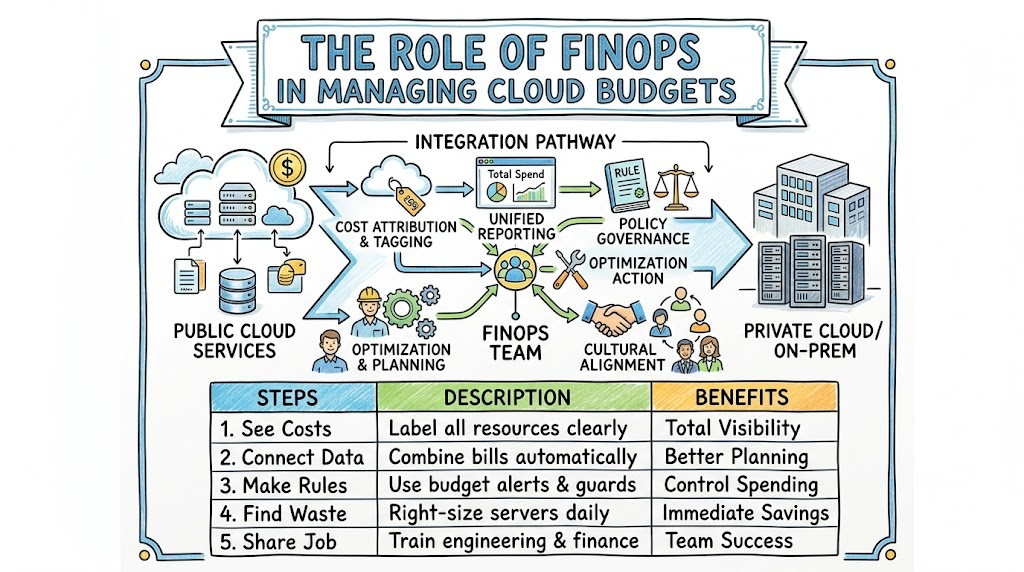
Computers power every game, app, and website today. Companies rent computers on the internet, which we call the cloud. But many companies also keep private computers in their own buildings.
Using both setups together is what we call a hybrid cloud. This setup gives teams big choices and great power. However, running both systems can cost a lot of money.
Money leaks happen fast when nobody watches the bill. That is where a smart practice called FinOps steps in to help. You can learn these simple cost rules at Finopsschool to save money.
What Is Hybrid Cloud?
Think of the public cloud like a rented bouncy castle. You pay for each hour you jump. When you finish jumping, you give it back.
Your private setup is like a swing set in your yard. Your parents bought it once, so you own it forever. But your family must fix it when it breaks.
A hybrid cloud simply combines the rented castle and your own swing set. Companies use their own gear for private data. Then, they rent internet cloud power when traffic gets super busy.
What Is FinOps?
FinOps means combining finance with daily computer work. Finance is just a fancy word for handling money. Ops is short for operations, which means running computer systems.
In the past, tech workers built things without asking about price tags. Later, the money team got a surprise bill at the end of the month. Nobody was happy because the bill was way too high.
FinOps brings both teams into the same room. Now, tech workers and money planners talk every single week. They work as one happy team to buy only what they need.
Why Mixing Them Is Tricky
Managing costs across two different setups feels like comparing apples to toy trucks. On-premise gear requires big payments years before you even use it. You pay for metal boxes, electric power, and chilly cooling rooms.
The public cloud works in the exact opposite way. You get a bill every minute a computer runs. If an engineer forgets to turn off a rented server, it bills you forever.
Therefore, leaders get confused when looking at two different bills. One bill comes once every five years. The other bill changes every single hour of the day.
Step 1: Label Every Single Asset
First, you must know who owns every single machine. Imagine putting name tags on all your school folders. If a folder drops on the floor, you know whose it is right away.
In computers, we call these sticky notes tags or labels. Engineers stick a digital tag on every rented computer. The tag names the team, the project, and the owner.
+------------------------------------+
|  Virtual Computer Server           |
|                                    |
|  [Tag: Team Alpha]                 |
|  [Tag: Project Video Game]         |
|  [Tag: Owner Sarah]                |
+------------------------------------+
Next, make sure your private data center uses these same labels. If you label both sides the same way, counting costs becomes super easy. Nobody can hide an expensive test server under the rug.
Step 2: Show the Real Bill
Next, show each team their total bill. We call this practice showback. When you turn on lights at home, you rarely see the electric meter run. But what if a screen showed the exact cost in coins?
You would quickly turn off the lights when leaving your bedroom. The same thing happens with smart computer teams.
When coders see their daily spend, they turn off idle machines. They stop spending money on projects that nobody uses anymore. Awareness fixes bad spending habits very fast.
+---------------------------------------------+
|              Daily Team Dashboard           |
|                                             |
|  - Team Alpha Spent:   $42 today            |
|  - Team Beta Spent:    $120 today (High!)   |
|  - Idle Servers Found: 3 turned off         |
+---------------------------------------------+
Step 3: Pick the Right Home
Every computer job needs the best home. Some jobs run every day, all year long. Other jobs run for only five minutes to process a quick photo.
- Steady jobs fit best on private computers because you already own the hardware.
- Spiky jobs fit best in the cloud because you can turn them off quickly.
- Test jobs belong in the cloud so you can delete them after class.
Putting a short test job on private hardware wastes money. Leaving a steady, unchanging job on peak cloud rates also wastes cash. Choosing the right spot saves tons of money.
Step 4: Clean Up the Waste
People often leave toys on the floor after playing. Engineers do the exact same thing with digital servers. They turn on five test machines, finish their homework, and walk away.
Those forgotten machines sit in the cloud and burn cash all night long. FinOps teams search for these ghosts and shut them down.
[ Forgotten Server Running ] ---> [ FinOps Scanner Finds It ] ---> [ Turn Off & Save Cash! ]
Also, look for machines that are much too big. If a program needs only two crayons, do not buy a box of sixty-four. Shrink the server down to fit the real workload.
How Private Gear and Cloud Differ
| Feature | Private Gear (On-Prem) | Rented Cloud |
|---|---|---|
| How You Pay | Buy once every few years | Pay for every second |
| Space Limits | Runs out of room fast | Endless room to grow |
| Electric Bill | You pay for power and fans | The cloud vendor pays it |
| Best Workload | Predictable, steady work | Sudden spikes and tests |
Create Shared Rules
Good teams need simple, fair rules. Write down a clear checklist for everyone to follow. If a developer needs ten new machines, ask them to explain why.
Make sure your rules do not slow down work. You want your friends to build cool apps quickly. But you also want them to clean up their digital mess.
Hold a short chat every week to share the numbers. Celebrate the engineers who lowered their monthly bills. Small rewards make saving money fun for everyone.
Watch for Secret Costs
Moving data between different places is not always free. Many public clouds let you put data in for zero dollars. But when you pull data back to your own building, they charge a fee!
We call these sneaky costs egress fees. If you move huge files back and forth all day, bills jump high.
Try to keep your data close to the program that reads it. Do not bounce files like a ping-pong ball between buildings. Keeping data still keeps your wallet full.
Helpful Daily Habits
Building great habits takes a little practice. Here are three simple habits to start this week:
- Check the score daily: Look at your spend graph every morning like the weather.
- Delete old scrap: Erase old test storage blocks that nobody opens anymore.
- Ask before buying: Check if your own building has free space before renting new cloud boxes.
When you practice these habits, your bills stay tiny. Your apps run super fast, and your boss stays happy.
FAQ Section
- What does the word FinOps mean in plain English?
FinOps means your money team and your computer team work together. They make sure the company gets good value from every dollar spent on tech.
- Can a small business use FinOps?
Yes, small teams can use these ideas right away. You do not need big tools to shut off unused servers and label your computers.
- Why do companies use both cloud and private gear?
Some companies already bought expensive servers and do not want to waste them. Also, keeping certain private files in your own building feels safer for some teams.
- What is an idle server?
An idle server is a rented computer that is turned on but doing zero work. It sits there quietly while still charging you money every minute.
- Who is responsible for cloud costs in FinOps?
Everyone shares the job. Coders, bosses, and finance workers all share the work to keep costs low and fair.
Final Thoughts
Running a hybrid cloud gives your business big muscle. You get the safety of your own building and the speed of the internet. But without a plan, costs can get out of hand.
FinOps gives you a friendly map to stay on track. Label your gear, show the daily score, and clean up idle machines. When everyone works together, your systems run fast without breaking your piggy bank.