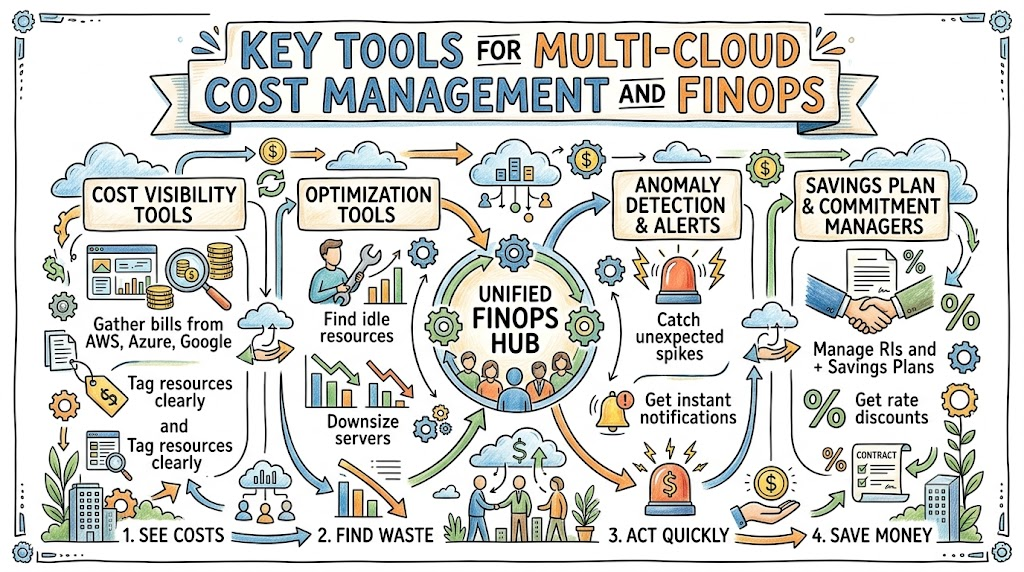
Managing computer systems across multiple cloud platforms can challenge any growing company. Many businesses rent machines from Amazon, Microsoft, and Google all at the same time.
However, watching bills from different providers creates confusion. Each cloud company uses different names, rules, and billing styles.
FinOps helps teams take control of this complex spending. You can learn these simple cost rules at Finopsschool to save money.
What Is Multi-Cloud?
Multi-cloud means using more than one cloud vendor to run your apps. A team might host websites on one platform and databases on another.
This setup prevents companies from getting stuck with just one vendor. It also keeps services online if one provider has a major outage.
However, using multiple clouds multiplies your financial homework. Finance workers struggle to track separate invoices that arrive in different formats.
What Is FinOps?
FinOps combines finance with daily software operations. The goal is to make everyone accountable for the money they spend.
In traditional setups, engineers buy servers without checking the price. Later, the accounting team receives a massive bill they cannot understand.
FinOps brings coders, managers, and finance workers into one room. They review usage daily and eliminate waste before costs get out of hand.
Why You Need Special Tools
Native tools from one cloud provider rarely show the full picture. Amazon tools track Amazon bills, but they ignore Microsoft and Google costs.
Opening three separate dashboards every morning wastes time. Worse, comparing different data metrics leads to expensive human errors.
Dedicated multi-cloud tools pull every bill into a single unified screen. These platforms translate confusing billing codes into clear numbers everyone understands.
+-------------------------------------------------------+
|             Single Multi-Cloud Dashboard              |
|                                                       |
|   [AWS Costs]   +   [Azure Costs]   +   [GCP Costs]   |
|         \                 |                 /         |
|          ----->   Unified Total Spend   <----         |
+-------------------------------------------------------+
Key Operational Concepts You Must Know
Unified Cost Visibility
Unified visibility brings all your cloud numbers into one central place. It connects to every cloud account using secure software connections.
Next, the tool normalizes the data so every line item makes sense. It converts weird technical codes into plain terms like compute, memory, and storage.
This unified view helps managers see total spending at a quick glance. No one has to download spreadsheets and stitch numbers together manually.
Automated Anomaly Detection
An anomaly is an unexpected spike in your normal daily bill. For example, a broken script might launch fifty huge servers overnight.
Good tools use smart math to catch these sudden spikes immediately. The system sends an instant alert to chat apps like Slack or Teams.
Because alerts arrive quickly, engineers fix mistakes in minutes instead of weeks. Rapid detection saves companies thousands of dollars in surprise charges.
[ Normal Spend: $100/day ] ---> [ Spike: $2,000/hour! ] ---> [ Instant Slack Alert! ]
Resource Tagging Hygiene
Tags are digital label stickers attached to your cloud servers. Every tag identifies the owner, the environment, and the project name.
Without tags, your cloud account becomes a messy garage full of mystery boxes. You cannot tell which team spent money on which application.
FinOps platforms scan your systems to find untagged resources right away. They can even stop engineers from launching servers that lack required labels.
Top Multi-Cloud FinOps Tools
| Tool Name | Best For | Key Advantage |
|---|---|---|
| Vantage | Fast setup | Clean user interface and fast team onboarding |
| Apptio Cloudability | Large enterprises | Deep financial reporting and corporate planning tools |
| Harness CCM | Developer teams | Connects cost data directly to code delivery pipelines |
| Kubecost | Container setups | Shows granular costs inside shared Kubernetes clusters |
Platform Implementation vs. Culture — What’s the Real Difference?
The Mechanics of Tool Deployment
Platform implementation means buying software and plugging it into your clouds. Engineers set up access keys, configure dashboards, and create notification channels.
Tools excel at sorting big data files and finding idle assets. They generate colorful pie charts and highlight servers you should downsize.
However, a tool cannot click the delete button on its own. Software provides helpful data, but human beings must make the final call.
+---------------------------------+       +---------------------------------+
|     Platform Implementation     |  -->  |        Cultural Adoption        |
|  (Dashboards, Tools & Alerts)   |       |  (Accountability & Daily Habits) |
+---------------------------------+       +---------------------------------+
Driving Genuine Behavioral Transformation
Cultural change teaches workers to treat cost like a core engineering metric. A good engineer cares about system speed, safety, and price equally.
Without a strong culture, teams ignore dashboard warnings completely. Automated alerts end up buried in noisy email folders where nobody looks.
True FinOps happens when developers take real pride in building lean architectures. Education and open chats turn cost tracking into a team sport.
Real-World Use Cases of Modern Operations
Taming Container Costs Across Regions
A media company ran hundreds of microservices inside large container clusters. Their containers ran across two different clouds to keep video streams fast.
However, the company could not figure out which video service cost the most. Their monthly cluster bills arrived as one giant, confusing lump sum.
The team installed Kubecost alongside a multi-cloud FinOps management dashboard. The software tracked actual CPU and memory usage down to the individual pod.
+-----------------------------------+
| Multi-Cloud Container Cluster    |
+-----------------------------------+
                 |
                 v
+-----------------------------------+
| Pod-Level Resource Tracking       |
+-----------------------------------+
                 |
                 v
+-----------------------------------+
| Accurate Team Cost Allocation     |
+-----------------------------------+
Armed with clear data, developers removed idle background containers. They cut cluster waste by thirty percent within their first two months.
Automated Shutdown of Test Environments
A software shop employed dozens of engineers who created test servers daily. Developers often forgot to delete these temporary boxes before logging off for the weekend.
The finance director noticed huge bills for servers running with zero active users. The team connected an automated FinOps tool to manage development schedules.
The platform detected idle testing systems and shut them down every Friday evening. Engineers restarted machines on Monday morning with a single click.
This simple routine eliminated hundreds of hours of unused cloud uptime. The business saved money immediately without slowing down software development.
Common Mistakes in Operations Engineering
Buying Tools Before Establishing Processes
Many leaders buy expensive tools thinking software will solve bad spending habits. But a fancy dashboard cannot fix messy team communication.
If your team lacks a clear tagging plan, tools cannot sort your data. The dashboard simply displays messy, unhelpful charts that confuse your staff.
Start by defining simple rules on paper before buying costly software subscriptions. Clean up your basic processes first, then pick tools that match your workflow.
- Agree on standard tags before turning on advanced monitoring platforms.
- Assign direct ownership for every cloud account and production workload.
- Review spending weekly so problems never sit unattended for a month.
Ignoring Spot Instances and Savings Plans
Another common mistake is running all workloads at default on-demand rates. On-demand pricing is the most expensive way to rent cloud infrastructure.
Cloud vendors offer large discounts when you commit to steady usage over time. They also offer surplus capacity, called spot instances, at massive discounts.
+--------------------------------------+
| Analyze Steady Baseline Workloads   |
+--------------------------------------+
                   |
                   v
+--------------------------------------+
| Apply Commitment Plans & Spot Nodes  |
+--------------------------------------+
                   |
                   v
+--------------------------------------+
| Cut Compute Rates by up to 70%       |
+--------------------------------------+
Failing to use these discount options leaves thousands of dollars on the table. FinOps tools highlight steady workloads that qualify for commitment discounts safely.
How to Become an Operations Expert — Career Roadmap
Mastering Cloud Platforms and Tooling
Becoming an expert starts with understanding how major cloud networks operate. Learn how virtual machines, storage blocks, and container clusters generate hourly charges.
Next, practice using multi-cloud platforms to build reports and cost monitors. Earning certifications from major cloud providers builds strong credibility with employers.
- Study public cloud basics across Amazon, Microsoft, and Google platforms.
- Practice data tagging and build simple budget alerts in sandbox environments.
- Learn container mechanics to track workloads running on Kubernetes clusters.
Learning Business Finance and Team Leadership
Technical knowledge is only half the battle for modern FinOps specialists. You must also learn the basic language of corporate finance and accounting.
Understand how budgets work, how expenses get tracked, and why margins matter. This skill allows you to explain complex engineering problems to executive leaders clearly.
- Learn basic accounting concepts like capital costs versus operational spending.
- Practice public speaking to share cost dashboards with engineering peers comfortably.
- Translate technical savings into clear business value that managers celebrate.
FAQ Section
- Why should a business use multiple cloud providers at once?
Companies use multiple clouds to avoid vendor lock-in and prevent downtime. They also pick specific providers that offer the best tools for unique jobs.
- Can open-source tools help manage multi-cloud costs?
Yes, many teams use open-source tools like Cloud Custodian and Kubecost. These free tools provide great visibility before you invest in paid enterprise platforms.
- How do FinOps tools find wasted cloud spending?
These tools monitor CPU, memory, and network activity over several weeks. If a server sits idle, the software flags it for deletion or downsizing.
- Who uses multi-cloud FinOps software inside a company?
Software engineers, system architects, finance managers, and team leaders use these platforms. Each person views customized dashboards tailored to their specific daily goals.
- What is the first step when choosing a FinOps tool?
First, write down your biggest spending problems and list all your clouds. Choose a tool that supports your platforms and fits your engineering workflow easily.
Final Summary
Multi-cloud setups give modern businesses incredible power, flexibility, and resilience. But running workloads across multiple vendors can quickly create billing nightmares.
Using specialized FinOps tools brings complete visibility back to your teams. These platforms uncover waste, alert engineers to spikes, and organize complex bills.
Pairing modern software with a strong culture of team accountability delivers lasting success. With the right tools and habits, your company can build fast while protecting every dollar.